

Get Started
What can we help with?
Can't find the answer you're looking for? Ask us.
Accounts & Membership
Find answers to common Embers Credit Union membership and account questions, including how to open an account, who can join, routing numbers, deposit insurance, and Share ID numbers.
What do I need to open an account at Embers Credit Union?
To open an account at Embers Credit Union, you’ll just need basic personal information, including your Social Security number, date of birth, and address. In many cases, you can open an account online in as little as 3 minutes.
If you’d rather open an account in person, you can also book an appointment at any of our seven retail locations, and our team can walk you through the process.
Who can join Embers Credit Union?
Embers Credit Union membership is open to people who live, work, worship, attend school, or own real estate in Michigan’s Upper Peninsula or select Northern Wisconsin counties. Immediate relatives of current Embers members are also eligible to join.
Eligible counties include: Alger, Baraga, Chippewa, Delta, Dickinson, Florence, Forest, Gogebic, Houghton, Iron, Keweenaw, Luce, Mackinac, Marinette, Marquette, Menominee, Ontonagon, Schoolcraft, and Vilas.
What is Embers Credit Union's routing number?
Embers Credit Union’s routing number is 291172844. You may need this number to set up direct deposit, automatic payments, ACH transfers, or external account transfers.
You can also find your account information in Embers digital banking or contact our team if you need help confirming the correct account number to use.
Are my deposits insured at Embers Credit Union?
Yes. Deposits at Embers Credit Union are federally insured by the National Credit Union Administration, or NCUA.
NCUA insurance protects the money you’re entitled to receive from your deposit accounts at a credit union that becomes insolvent. Coverage is provided up to $250,000 per person, per institution, per ownership category.
Qualifying Embers accounts may also be eligible for additional deposit protection of up to $10,000,000 through Excess Share Insurance provided by Embers.
The NCUA is a federal agency created by Congress to regulate credit unions and insure member deposits, similar to how the FDIC insures deposits at banks.
How do I add or remove a joint owner on my account?
To add or remove a joint owner on your Embers Credit Union account, please contact our team or book an appointment at one of our retail locations. Because joint ownership affects account access and legal ownership, we’ll help walk you through the required steps and documentation.
In general, adding a joint owner may require identifying information for the person being added, including their Social Security number, date of birth, address, and valid identification.
Removing a joint owner may require additional paperwork or, in some cases, opening a new account. Our team can review your account and help determine the best next step.
What is a Share ID number?
A Share ID number is a number that identifies a specific account under your Embers Credit Union membership, such as a checking, savings, or other deposit account. It is usually a two-digit number.
- 00 – Savings
- 10 or 30 – Checking
You may need your Share ID in certain situations, like making a member-to-member transfer within digital banking or confirming which account money should move to or from.
Because one membership can have multiple accounts, the Share ID helps make sure funds are sent to the right place.
Checking & Savings
Learn how checking and savings accounts work, how to set up direct deposit, switch to Embers, avoid monthly fees, and open accounts for younger savers.
What is the difference between checking & savings?
A checking account is built for everyday money movement. It’s typically used for debit card purchases, direct deposit, bill payments, ATM access, transfers, automatic payments, and other day-to-day spending.
A savings account is built for setting money aside and helping it grow over time. Most people use savings for goals, emergencies, future expenses, or money they want to keep separate from daily spending.
The simplest way to think about it: checking is for money you plan to use soon, while savings is for money you want to hold onto.
How do I set up direct deposit?
Direct deposit is a fast, secure way to have your paycheck sent straight to your Embers account. Most of the time, you can set it up through your employer’s payroll portal or by sending a completed direct deposit form to your HR department.
You’ll typically need:
- The Embers routing number: 291172844
- Your account number
- The account type (ex: checking or savings)
You can find your account information in Embers digital banking, or contact our team if you need help confirming the right details before setting up direct deposit.
How do I switch my checking account to Embers?
Switching your checking account to Embers Credit Union starts with opening your new Embers checking account online or at one of our retail locations. Once your new account is open, you can move over your direct deposit, automatic payments, subscriptions, and recurring transfers.
A simple way to switch:
1. Open your new Embers checking account
You can open an account online in as little as 3 minutes.
2. Update your direct deposit
Give your employer the Embers routing number, your new account number, and the account type.
Embers routing number: 291172844
3. Move automatic payments and subscriptions
Update payments tied to your old account, including utilities, loans, insurance, streaming services, memberships, and other recurring bills.
4. Transfer your balance
Move money from your old account to your new Embers checking account once your payments and deposits are updated.
5. Keep your old account open for a short time
Before closing your old checking account, make sure all checks, debit card transactions, automatic payments, and direct deposits have cleared.
If you’d like help switching, you can contact Embers or book an appointment at one of our seven retail locations.
What is Fire Rewards Checking?
Fire Rewards Checking is an Embers checking account that gives members the chance to earn a higher rate on their checking balance when monthly qualifications are met.
It’s built for everyday banking, with debit card access, digital banking, direct deposit, bill pay, ATM access, and no monthly fee. Members can also earn up to 3.04% APY on qualifying balances and get up to $10 in ATM fee refunds per month when account requirements are met.
Fire Rewards Checking is a good fit for members who want their checking account to do more than hold spending money — especially if they use their debit card regularly, have direct deposit, and want the opportunity to earn more on everyday balances.
How do I open a savings account for a teen or child?
How do I avoid monthly fees?
Avoiding monthly fees at Embers Credit Union is pretty simple. Embers checking accounts have no monthly fee, and debit cards and credit cards have no annual fee.
The easiest way to avoid common account fees is to:
Enroll in eStatements
Paper statements may have a monthly fee for certain accounts, so eStatements are the easier, fee-free option.
Keep your account in the positive
Overdraft paid and overdraft returned items may each result in a fee, so keeping enough money in your account before purchases, checks, transfers, and automatic payments can help you avoid extra charges.
You can also use Embers digital banking to check balances, review transactions, set up alerts, and keep a closer eye on your account before money moves.
Cards & Fraud
Find help with card issues, unfamiliar transactions, declined purchases, digital wallets, disputes, lost or stolen cards, and fraud-related questions.
How do I report a lost or stolen debit card or credit card?
If your Embers debit or credit card is missing, you can use the Card Management tool in digital banking to take action quickly.
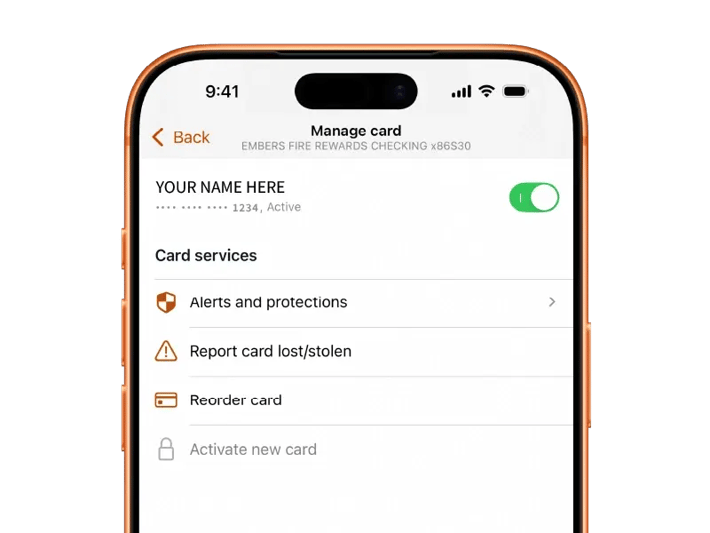
If you’re not sure whether the card is lost, you can temporarily turn it off in the app while you look for it. If you find it, you can turn it back on. If you realize it’s gone or may have been stolen, select Report card lost/stolen in Card Management.
You can also contact Embers for help by calling our team, sending a support message through our website, or reaching out through digital banking.
If you see any transactions you don’t recognize, let us know right away so we can help review the activity and take the next steps.
What should I do if I don't recognize a transaction?
If you see a transaction in digital banking that you don’t recognize, start by tapping the transaction and selecting Attach to a conversation. This will send the transaction details to an Embers Member Support Specialist, and our team can help you look into it.
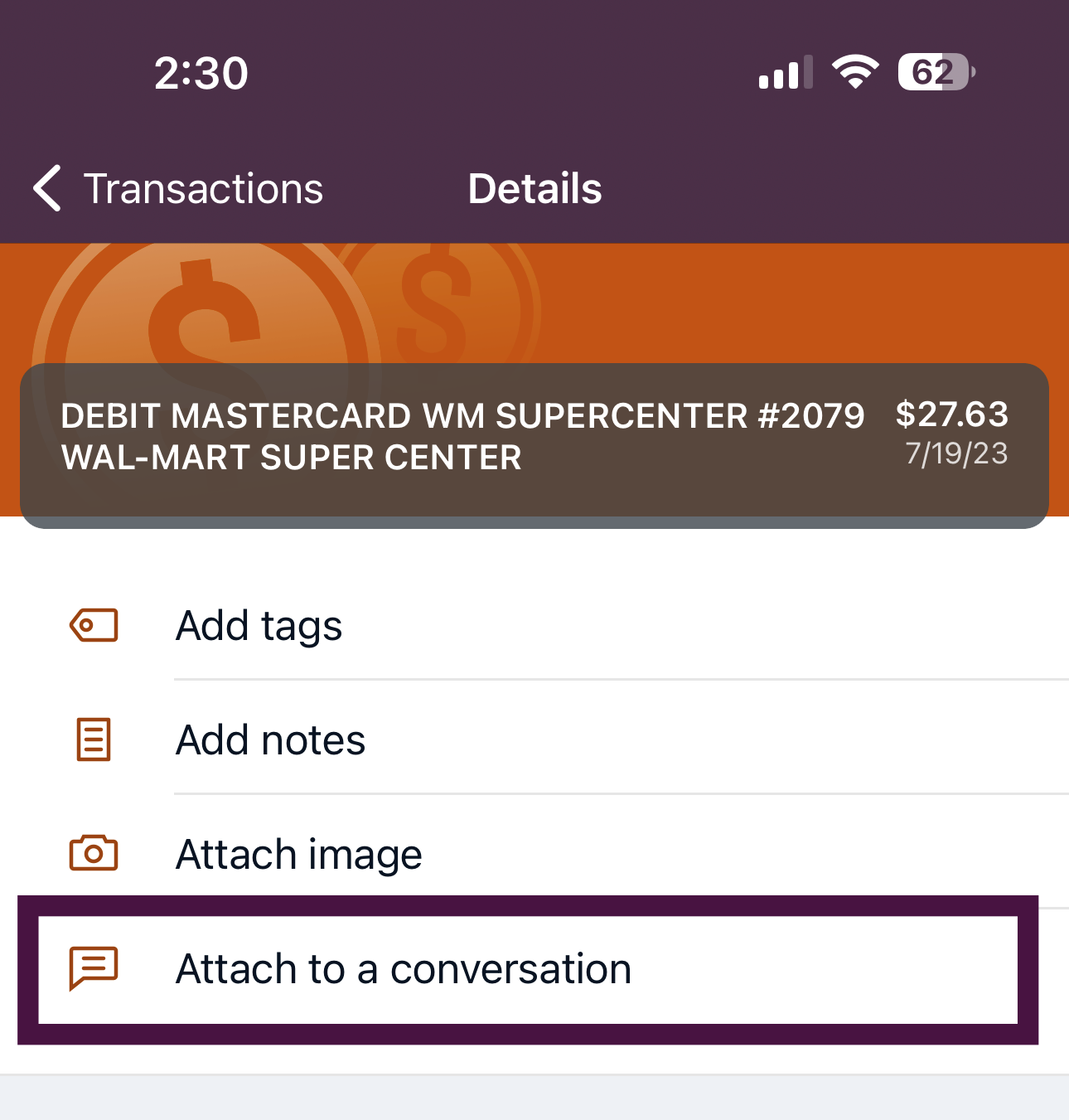
Before reporting it as fraud, it can also help to do a quick check:
Search the merchant name online
Some businesses show up under a different name than the store or app you used.
Ask any joint owners
If someone else is on the account, check whether they made the purchase.
Check your email or messages for a receipt
Online orders, subscriptions, app purchases, and delivery services can sometimes be easy to forget.
If the transaction still doesn’t look right, reach out to us right away. You are protected from unauthorized or fraudulent activity, and we’ll help you take the next steps.
What should I do if I was charged for something I didn’t receive?
If you paid for something and never received it, start by contacting the company first. Try reaching them through their website, email, phone number, order confirmation, or customer support portal to ask about delivery, cancellation, or a refund.
If the company cannot help or does not respond after a reasonable amount of time, Embers can help you review the charge and start the dispute process. For many purchases, it’s best to allow reasonable time for delivery, which may be around 30 days, before filing a dispute.
You can contact Embers through digital banking,send a support message through our website, or call our team for help. Be ready to share details like the merchant name, transaction amount, purchase date, order confirmation, and any messages between you and the company.
What is the difference between fraud and a scam?
Fraud is when money is taken from your account without your permission or knowledge. If your card or account information is stolen and used without you authorizing the transaction, that is considered fraud. With true fraud, you have dispute rights and should contact Embers right away.
A scam is different. A scam happens when someone tricks you into sending money, sharing information, buying gift cards, transferring funds, or approving a transaction yourself. Even though you were misled, the transaction may have been authorized by you. Embers can try to help recover the funds, but scam-related transactions may not have the same dispute rights, and recovery is not always possible.
If you believe your card is lost or stolen, or if you notice suspicious activity, contact Embers immediately by sending us a message or calling 906-228-7080.
How do I dispute a charge/transaction?
If you were charged for something you didn’t receive, were charged the wrong amount, or have another issue with a purchase, start by contacting the merchant first. Try reaching them through their website, email, phone number, order confirmation, or customer support portal to ask about delivery, cancellation, or a refund.
If the merchant cannot help or does not respond after a reasonable amount of time, Embers can help you review the charge and start the dispute process. For many purchases, it’s best to allow a reasonable time for delivery, which may be around 30 days, before filing a dispute.
You can contact Embers through digital banking, send a support messageupport message through our website, or call our team for help. Be ready to share details like the merchant name, transaction amount, purchase date, order confirmation, and any messages between you and the company.
How do I add my Embers card to Apply Pay, Google Pay, or Samsung Pay?
To add your Embers debit or credit card to Apple Pay, Google Pay, or Samsung Pay, start by opening the digital wallet you want to use and following the steps to add a new card.
You’ll be asked to enter or scan your card information and accept the digital wallet’s terms and conditions. After that, you may need to call Embers to verify that you are the person adding the card to your digital wallet.
This extra verification step helps keep your account secure and helps prevent unauthorized card activity. Once your card is verified, you can use it for eligible contactless and mobile wallet purchases.
Why was my debit/credit card declined?
A debit or credit card can be declined for several reasons, and it does not always mean something is wrong with your account. Common reasons include:
Not enough available funds or credit
Your debit card may be declined if there is not enough money available in your account. Your credit card may be declined if the purchase would go over your available credit limit.
Incorrect card information
Online purchases may be declined if the card number, expiration date, CVV, ZIP code, or billing address does not match.
Card controls or limits
Your card may be turned off in Card Management, or the transaction may exceed a daily spending or withdrawal limit.
Suspicious activity protection
A transaction may be blocked if it looks unusual or potentially fraudulent. This helps protect your account from unauthorized activity.
Merchant or transaction restrictions
Some transactions may be blocked based on merchant type, location, or card settings.
Expired, damaged, or inactive card
Your card may not work if it is expired, damaged, not activated, or has been reported lost or stolen.
If your card is declined, check your account balance, card status, and recent alerts in Embers digital banking. You can also contact Embers or send us a support message so our team can help review what happened.
Digital Banking & Mobile App
Get answers about enrolling in digital banking, resetting your password, linking external accounts, using mobile deposit, Bill Pay, transfers, and other online banking tools.
How do I enroll in Embers digital banking?
You can enroll in Embers digital banking online by visiting my.embers.org/enroll and following the prompts to set up your account.
You can also enroll from your phone by downloading the Embers mobile app from the Apple App Store or Google Play Store.
Once enrolled, you can use digital banking to check balances, transfer money, deposit checks, manage cards, pay bills, send support messages, and stay connected to your accounts wherever you are.
How do I reset my digital banking password?
You can reset your Embers digital banking password from the login screen. Select “Forgot?” next to the username field, then follow the prompts to verify your account.
You may be asked to enter either:
Your username and the email address associated with your account
or
Your Social Security number and account number
After your information is verified, you’ll be able to start the password reset process.
If you have trouble resetting your password or are not sure which information to use, contact Embers, and our team can help you get back into your account.
How can I link my other bank accounts to my Embers app?
You can link an external account in Embers digital banking so you can move money between your Embers account and another financial institution.
In the Embers mobile app, go to Accounts and select the + sign. On desktop, select Add an external account.
To verify that you own the other account, two small deposits will be sent to that account. Once you see those deposits, return to Embers digital banking and enter the two deposit amounts to finish linking the account.
After the account is verified, you’ll be able to use it for eligible external transfers.
How can I transfer money to someone?
You can transfer money from your Embers account in a few different ways, depending on who you’re sending money to and how quickly you need it to move.
In the Transfers tab of Embers digital banking, you’ll see options like:
Rapid Transfer
Link a non-Embers debit card from another financial institution to transfer money to or from your Embers account almost instantly.
Standard Transfer
Move money between your Embers accounts or between Embers and linked external accounts. Transfers between Embers accounts typically happen instantly, while external transfers that are not eligible for Rapid Transfer may take a few business days.
Member-to-member transfers
Send money to another Embers member through digital banking.
Zelle®
After your account has been open for 30 days, you’ll be able to send money to almost anyone using Zelle®.
If you’re not sure which transfer option to use, start in the Transfers tab in digital banking or contact Embers and our team can help you choose the best way to move your money.
What is Bill Pay and how do I enroll/use it?
Bill Pay is a service in Embers digital banking that lets you pay bills from your checking account. You can use it to send payments to companies, service providers, or other payees without needing to write and mail checks yourself.
To use Bill Pay for the first time, you’ll need to register through Embers digital banking using a web browser and an eligible checking account. Once you’re registered, you can add payees, schedule payments, and manage upcoming bills.
To add a new payee, go to the Payee list and select Add Payee.
To delete a payee, select the payee from your Payee list, then choose the trash can icon in the top right corner.
To delete a scheduled payment, select the payment from your payment list and choose Delete in the top right corner. If the delete option is not available, it may be too late to cancel the payment.
How long does mobile deposit take?
Mobile deposit availability depends on the amount of the check and when it is submitted.
For mobile deposits at Embers, $225 or more may be available immediately. The remaining funds are typically available after two business days.
Business days do not include weekends or holidays, so deposits made near a weekend or holiday may take a little longer to become fully available.
How do I deposit a check with mobile deposit?
You can deposit a check from the Embers mobile app using Deposit checks.
Here’s how it works:
1. Sign in to the Embers app
Open the Embers app and sign in to your account.
2. Open the menu
Tap the menu icon in the top left corner, then select Deposit checks.
3. Start your deposit
Tap Deposit a check, then choose the account where you want the check deposited.
4. Take photos of the check
Place the check on a flat, well-lit surface. Take a photo of the front, then flip the check over and take a photo of the back.
5. Endorse the check correctly
Before submitting, make sure the back of the check is signed and includes:
“For mobile deposit only to Embers account #_____”
Use your actual Embers account number in place of the blank. Missing or incorrect endorsement may cause the deposit to be rejected or delayed.
6. Submit the deposit
Once the front and back photos are complete, tap Submit. Your deposit will be sent to Embers for review.
Loans & Payments
Learn how to apply for a loan, make payments from another financial institution, check payoff amounts, understand approval timing, and prepare the documents you may need.
How do I apply for a loan at Embers Credit Union?
You can get started with a loan at Embers Credit Union by booking an appointment online for consumer loans like credit cards, auto loans, and personal loans. You can choose a time that works for you and connect with our team to talk through your options.
You can also fill out a lead form on the loan product page that fits what you’re looking for, and an Embers team member can follow up to help with next steps.
For mortgage loans, you can already apply completely online through Embers. This includes starting your application, sharing information, and moving through the mortgage process digitally.
Coming in late 2026, Embers members will also be able to apply for consumer loans and receive preapproval completely online, making the process even faster and easier.
Can I pay my Embers loan from another financial institution?
Yes. You can pay your Embers loan from another financial institution online through the SWIVEL payment portal.
The first time you use SWIVEL, you’ll need to register and create an account. After that, you can log in using the email and password you set up during registration to make future loan payments.
This can be a helpful option if your payment is coming from an account at another bank or credit union.
What do I need to apply for a loan?
What you need to apply for a loan depends on the type of loan you’re applying for.
For most consumer loans, like a credit card, auto loan, personal loan, or recreational loan, you’ll typically need:
-
Social Security Number
-
Valid ID
-
1-2 most recent pay stubs
Mortgage loans usually require a little more documentation. You'll need:
- 2 years of W-2s
- 2 years of federal tax returns, if self-employed
- Pay stubs from the past 30 days
- 2 months of bank and investment statements, including all pages.
You can find the exact documents needed for each loan type on our What You’ll Need page before you apply.
How do I check my loan payoff amount?
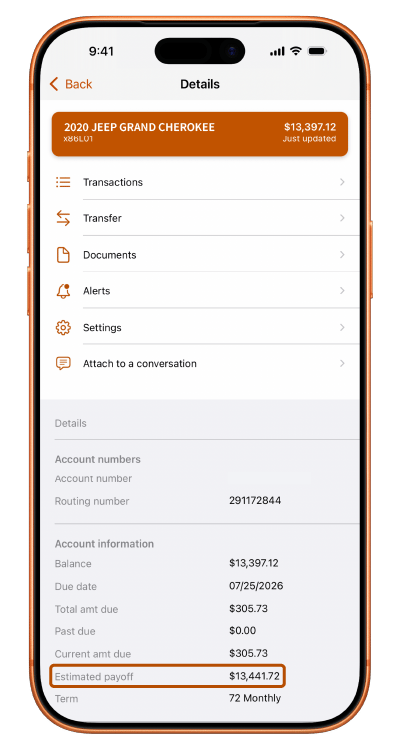
You can check your estimated loan payoff amount in Embers digital banking. Log in, choose your loan account, and open the account details. Near the bottom of the details screen, you’ll see an Estimated payoff line.
You can also contact us or visit your local branch, and an Embers Team Member can help provide payoff information for your loan.
What affects my loan rate?
Your loan rate depends on a few different factors, including the type of loan you apply for, your credit profile, the loan term, and whether the loan has a fixed or adjustable rate.
In general, lenders look at things like your credit score, credit history, income, debt, payment history, and the amount you’re borrowing. For secured loans, like auto loans or recreational loans, the vehicle or collateral may also play a role.
The type of rate matters too. A fixed-rate loan keeps the same interest rate for the life of the loan. An adjustable-rate loan may change over time based on market conditions and the terms of the loan.
Because every application is different, your final rate is based on your full credit profile and the loan details at the time you apply. An Embers Team Member can help walk through your options and explain what may affect your rate.
How long does loan approval take?
Loan approval timing depends on the type of loan you’re applying for, the information needed, and whether anyone else, like a joint applicant or cosigner, needs to be included.
For many consumer loans, like auto loans, personal loans, credit cards, or recreational loans, you’ll typically receive either an approval or a plan to help improve your credit profile for a future approval during your meeting with an Embers Loan Officer, as long as the required information is available.
For mortgage loans, you’ll typically leave your meeting with a good idea of your pre-approval amount. Finalizing the pre-approval may take 1–2 days, depending on whether a cosigner is needed, whether additional documents are required, and how quickly all requested documents are submitted.
The fastest way to keep things moving is to have your documents ready before applying. An Embers Team Member can let you know what’s needed based on the loan type.
Locations, ATMs, & Hours
Find information about Embers branch locations, office hours, ATM access, cash and check deposits, and the ATM networks available to members.
Where is the nearest Embers Credit Union branch?
The nearest Embers Credit Union branch depends on where you are. Embers has seven retail locations across the Upper Peninsula, including two branches in Marquette, two in Escanaba, and one branch each in Munising, Negaunee, and Gwinn.
You can find the closest branch, view hours, and get directions by using our Find a Location page.
What are Embers Credit Union's hours?
Embers Credit Union hours vary by location, based on branch traffic and the community each office serves. A good rule of thumb is that all Embers locations are open Monday through Friday, 9:00 a.m. to 5:00 p.m. Eastern Time.
Drive-thru hours may vary by location. Some drive-thrus follow regular branch hours, while our Marquette and Escanaba drive-thrus are open Monday through Friday, 8:00 a.m. to 6:00 p.m. Eastern Time.
Select Embers locations are also open on Saturdays, including Marquette, Escanaba, Negaunee, Gwinn, and Munising.
For the most accurate hours, including lobby, drive-thru, and Saturday availability, visit our Find a Location page.
Can I make cash deposits at Embers ATMs?
Yes. You can deposit cash and checks at all Embers Credit Union ATMs, giving you a convenient way to add money to your account outside of regular branch visits.
You may also be able to make deposits at CO-OP and Allpoint ATMs that support deposit-taking. Because not every network ATM accepts deposits, check the ATM details before you go and follow the on-screen instructions carefully. Deposit availability may vary by ATM network, deposit type, and timing.
What ATM networks does Embers Credit Union partner with?
Embers members can use Embers Credit Union ATMs, plus thousands of surcharge-free ATMs through the CO-OP and Allpoint ATM networks.
That means you can access your money at many participating ATMs beyond Embers branch locations, including ATMs across Michigan’s Upper Peninsula and nationwide. Some CO-OP and Allpoint ATMs may also accept deposits, but deposit-taking availability varies by location.
To find an ATM near you, use the Find a Location page and check the ATM details before you go.
Deposits & Transfers
Get clear answers about direct deposits, payroll and benefits payments, mobile deposit, pending deposits, external transfers, ACH payments, wires, and moving money between accounts.
When will my direct deposit, payroll, or benefits payment post?
Direct deposits, payroll deposits, and benefits payments post based on the payment’s settlement date. In some cases, Embers may receive a payment notification before the deposit is ready to settle. When that happens, you may see the deposit listed as pending in digital banking.
Embers will not credit a direct deposit more than five business days before the payment settles to us. This early access is available automatically and free of charge. Business days do not include weekends or holidays.
If you see a pending deposit, that means we’ve received notice of the incoming payment, but the funds may not be available yet. Once the deposit is eligible to post, it will be credited to your account.
Can I make a deposit into an account that I'm not on?
Yes. You can make a deposit into any Embers Credit Union account, even if you are not listed on the account.
However, if you are not an owner or authorized signer on the account, we cannot share account information with you. That means we cannot provide details like the account balance, transaction history, whether the deposit posted, or any other private account information.
You’re welcome to make the deposit, but only authorized account owners can receive information about the account.
How long does mobile deposit take?
Mobile deposit availability depends on the amount of the check and when it is submitted.
For mobile deposits at Embers, $225 or more may be available immediately. The remaining funds are typically available after two business days.
Business days do not include weekends or holidays, so deposits made near a weekend or holiday may take a little longer to become fully available.
How can I transfer money to another person?
You can transfer money from your Embers account in a few different ways, depending on who you’re sending money to and how quickly you need it to move.
In the Transfers tab of Embers digital banking, you’ll see options like:
Rapid Transfer
Link a non-Embers debit card from another financial institution to transfer money to or from your Embers account almost instantly.
Standard Transfer
Move money between your Embers accounts or between Embers and linked external accounts. Transfers between Embers accounts typically happen instantly, while external transfers that are not eligible for Rapid Transfer may take a few business days.
Member-to-member transfers
Send money to another Embers member through digital banking.
Zelle®
After your account has been open for 30 days, you’ll be able to send money to almost anyone using Zelle®.
If you’re not sure which transfer option to use, start in the Transfers tab in digital banking or contact Embers and our team can help you choose the best way to move your money.
How do I set up an external transfer?
You can set up an external transfer from your Embers account to your account at another financial institution using the External Transfer feature in digital banking.
To get started, log in to Embers digital banking and go to Accounts > Add Account. From there, you can link your external account and manage transfers between your Embers account and your account at another bank or credit union. This option gives you more control over your transfers and may allow for faster settlement.
You can also contact Embers or stop by one of our offices to complete an ACH transfer form. To set up the transfer this way, we’ll need the routing number and account number for the receiving financial institution.
What information do I need to send a wire transfer?
The information needed for a wire transfer depends on whether the wire is being sent to your Embers account or from your Embers account.
Incoming wires
To receive a wire into your Embers Credit Union account, provide the sender with the following information:
Receiving financial institution:
Alloya Corporate Credit Union
Routing number: 272478075
184 Shuman Blvd #400
Naperville, IL 60563
Phone: 800-342-4328
Credit to:
Embers Credit Union
Account number: 291172844
1001 W. Baraga Ave.
Marquette, MI 49855
Final credit to:
Member’s name and Embers account number
There is no fee for incoming wires. Incoming wires received before 5:00 p.m. Eastern Time are posted the same day. Wires received after 5:00 p.m. Eastern Time are posted the following banking day.
Outgoing wires
To send a wire from your Embers account, you’ll need to provide complete outgoing wire instructions for the financial institution or recipient receiving the funds.
Outgoing wire requests must be received by:
Domestic wires: 4:00 p.m. Eastern Time
International wires: 3:00 p.m. Eastern Time
Outgoing wires require a member signature or callback verification using the current phone number on file with Embers Credit Union.
Fees are:
Domestic wire: $20
International wire: $40
How do I place a stop payment on a check or ACH?
You can request a stop payment on a check or ACH by contacting Embers through digital banking, calling our team, or visiting one of our offices.
A stop payment fee is $20, and the stop payment will take effect within one business day.
For checks, a stop payment requested verbally will remain active for 14 days. With a signed request, a check stop payment can remain active for up to 6 months.
For ACH payments, a signed stop payment request can remain active permanently unless it is revoked.
Because timing matters, contact Embers as soon as possible if you need to stop a check or ACH payment before it clears.
What does ACH stand for, and what is it?
ACH stands for Automated Clearing House. It is an electronic network used to move money between bank and credit union accounts.
ACH is commonly used for things like direct deposit, automatic bill payments, external transfers, loan payments, payroll deposits, and recurring payments. For example, when your paycheck is deposited into your account or your utility bill is paid automatically from checking, that payment may move through the ACH network.
ACH transfers are different from wire transfers. Wires are usually faster and often used for larger or more time-sensitive payments, while ACH transfers are commonly used for everyday electronic payments and may take a few business days to process.
Security & Scams
Find out how to protect your account, spot scams, lock your card, report suspicious activity, and understand what Embers will never ask you to share.
What should I do if I think I've been scammed?
If you think you’ve been scammed, contact Embers Credit Union right away. The sooner you reach out, the sooner our team can review what happened and help you take the next steps.
Scams can happen through phone calls, text messages, emails, social media, online marketplaces, fake websites, payment apps, or someone pretending to be a trusted company, government agency, family member, or financial institution.
If you believe you sent money, shared account information, clicked a suspicious link, or gave someone access to your account, you should:
Contact Embers immediately
Call us, send a message through digital banking, or contact us through our website so our team can help review your account.
Stop communicating with the scammer
Do not reply, click more links, send more money, or share additional information.
Change your passwords
Update your Embers digital banking password and any other passwords that may have been shared or exposed.
Review your account activity
Look for transactions you don’t recognize and let us know if anything seems off.
Save any details
Keep screenshots, phone numbers, emails, text messages, receipts, transaction details, or anything else related to the scam.
Embers can help review your account, protect your information, and attempt to recover funds when possible. However, scam-related transactions may not always have the same dispute rights as unauthorized fraud, so it’s important to contact us as quickly as possible.
Will Embers ever ask for my password or verification code?
No. Embers Credit Union will never ask you to share your digital banking password or one-time verification code by phone, text, email, or authentication app.
Verification codes are meant to protect your account. If someone asks you to read or send them a code, even if they claim to be from Embers, it may be a scam.
If you receive a suspicious call, text, email, or message asking for private account information, do not respond or click any links. Contact Embers directly through digital banking, our website, or by calling our team so we can help review what happened and protect your account.
How can I protect my account from fraud?
You can help protect your account from fraud by staying alert, reviewing your account activity often, and being careful with your personal information, passwords, card details, and verification codes.
A few smart habits can help:
Review your account activity regularly
Check digital banking for transactions you don’t recognize and contact Embers right away if something looks off.
Protect your login information
Do not share your digital banking username, password, PIN, card number, or one-time verification codes with anyone.
Be careful with links and messages
Scammers may send fake texts, emails, or calls pretending to be a financial institution, company, government agency, or someone you know. When in doubt, stop and contact Embers directly.
Use account alerts and card controls
Set up alerts, monitor card activity, and use Card Management in digital banking to turn your card off if it is lost, stolen, or being used suspiciously.
Learn the warning signs
Embers offers a free online Fraud Protection center through Banzai, with resources on phishing, identity theft, peer-to-peer payment apps, scam red flags, compromised information, and online safety.
If you believe your account information has been stolen or you notice suspicious activity, contact Embers as soon as possible.
How do I freeze or lock my card?
You can freeze or lock your Embers debit or credit card in Card Management through digital banking. This is a quick way to temporarily turn your card off if it’s missing, misplaced, or you notice activity that doesn’t look right.
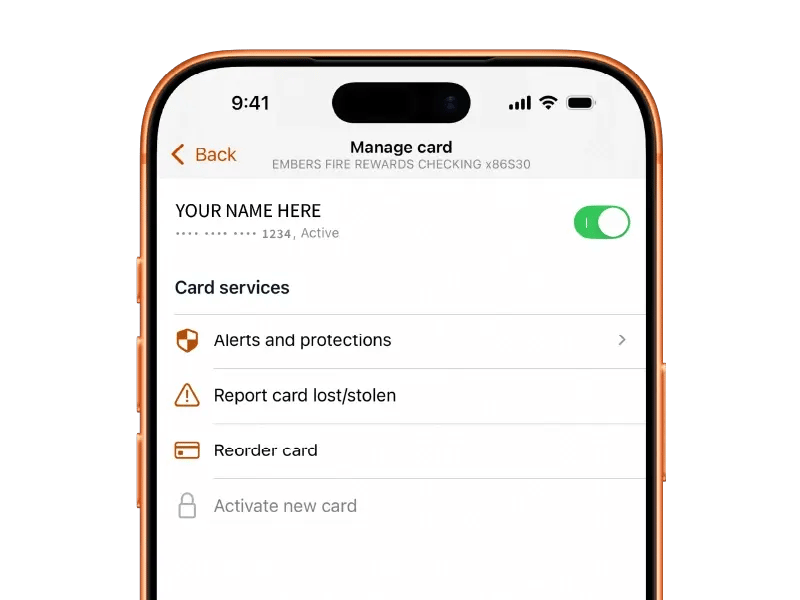
If you find your card, you can turn it back on in Card Management. If you realize your card is lost, stolen, or may have been used without your permission, select Report card lost/stolen in Card Management so the next steps can be taken.
You can also contact Embers by calling our team, sending a support message through our website, or reaching out through digital banking.
If you see transactions you don’t recognize, let us know right away so we can help review the activity and protect your account.
Foreign Transactions
Get answers about using your Embers cards internationally, ATM access outside the United States, travel notes, currency exchange, and international wires.
Are there fees for using my Embers debit or credit card internationally?
Embers does not charge a separate fee for using your debit or credit card internationally. However, purchases made in a foreign currency may still be subject to standard currency conversion rates or exchange-related charges from the card network or merchant.
Before traveling, it’s a good idea to let Embers know where you’ll be going so we can help reduce the chance of your card being flagged for unusual activity.
Can I use my Embers card at ATMs outside the United States?
Yes. You can use your Embers debit or credit card at ATMs outside the United States, similar to how you would use an ATM domestically.
The ATM owner may charge a usage fee, and the transaction may be subject to standard currency exchange rates or exchange-related charges. Embers does not charge an additional international ATM fee beyond those normal ATM or currency exchange costs.
Before traveling internationally, it’s a good idea to let Embers know where you’ll be going so we can help reduce the chance of your card being flagged for unusual activity.
What information do I need to send an international wire transfer?
To send an international wire from your Embers account, you’ll need to provide complete wire instructions and details about where the money is going.
You’ll typically need:
Wire amount and currency
The amount being sent and whether the wire should be sent in U.S. dollars or foreign currency.
Country of the beneficiary bank
The country where the receiving bank is located.
Originator details
Information about the person sending the wire, including the purpose of the wire.
Beneficiary details
The recipient’s name, account number or IBAN, address, phone number, date of birth, and email address.
Beneficiary bank details
The receiving bank’s name, SWIFT/BIC code, address, and phone number.
There is a $40 fee for international wires. Because international wire requirements can vary by country and receiving financial institution, it’s best to have as much information as possible before submitting your request.
Should I let Embers know before traveling internationally?
Yes. Before traveling internationally, please notify Embers Credit Union of your travel plans and travel dates. You can send us a message through digital banking, call our team, or stop by a branch.
This allows us to add a travel note for our fraud monitoring system, which can help reduce the chance of legitimate card activity being flagged as unusual while you’re away.
It’s also a good idea to make sure your contact information is up to date before you travel, just in case we need to reach you about card activity.
Does Embers offer foreign currency exchange?
Embers Credit Union does not offer foreign currency exchange at our branches.
If you’re traveling internationally, you may be able to access foreign currency by using your Embers debit card at ATMs abroad. ATM owners may charge a usage fee, and withdrawals may be subject to standard currency exchange rates or exchange-related charges.
Before traveling, it’s a good idea to notify Embers of your travel plans so we can add a note for our fraud monitoring system and help reduce the chance of your card being flagged for unusual activity.
Does Embers accept incoming international wires?
Business Banking
Learn what you need to open a business account, apply for business financing, and treasury tools.
What do I need to open a business account?
The documents needed to open a business account at Embers Credit Union depend on how your business is structured. In general, all account signers will need to provide a valid ID. Additional business documents may be required based on whether your business is an LLC, partnership, corporation, or organization.
LLC
For an LLC, you’ll need valid ID for all signers, proof of active business, and articles of organization. If your LLC has an operating agreement, bylaws, or EIN, please bring those as well.
Partnership
For a partnership, you’ll need valid ID for all signers, a partnership agreement, an Employer Identification Number, proof of active business, and articles of organization or incorporation. If bylaws or an operating agreement exists, please bring that too.
Corporation
For a corporation, you’ll need valid ID for all signers, bylaws or an operating agreement, an Employer Identification Number, proof of active business, and articles of incorporation.
Organization
For an organization, you’ll need valid ID for all signers, meeting minutes authorizing the account, and an Employer Identification Number.
Proof of active business and articles of incorporation or organization can typically be found through the State of Michigan’s LARA website. Some sole proprietorships may be listed on a personal tax return.
How do I apply for a business loan?
To apply for a business loan at Embers Credit Union, start by getting clear on a few key details, including how much funding you need, what the loan will be used for, how your business will repay it, and whether your current cash flow can support the loan.
Lenders typically review your revenue, cash flow, creditworthiness, business history, existing debt, and overall financial picture before making a decision. You may also need to provide documents such as business and personal tax returns, a profit and loss statement, balance sheet, financial projections, business formation documents, and a clear plan for how the loan will support your business.
At Embers, coming prepared with a defined loan request, project plan, purchase agreement, and owner résumé or professional bio can help our Business Lending Team better understand your goals and guide the conversation.
You can get started by booking an appointment online with our Business Lending Team.
What is treasury management?
Treasury management is a set of business banking services designed to help businesses manage cash flow, send and receive payments, deposit funds, reduce manual work, and protect accounts from fraud. These services can include ACH payments, wire transfers, payroll services, remote deposit capture, merchant services, Positive Pay, and other tools that help businesses manage money more efficiently.
At Embers Credit Union, we offer treasury management services for businesses across Michigan’s Upper Peninsula and our surrounding markets. Our local team helps businesses choose the right mix of payment, deposit, cash flow, and fraud prevention tools based on how they operate, whether they’re managing payroll, collecting rent or membership payments, depositing batches of checks, accepting customer payments, or moving money between accounts.